Hospital Queue Management System in Kenya: One Ticket from Kiosk to Discharge
TemFlow — Patient flow from kiosk to discharge
TemFlow screenshots
The problem with outpatient queues
A patient at an outpatient department may stop at registration, the cashier, triage, a consultation room, the laboratory, imaging, the pharmacy and back to billing before going home. In many facilities each stop has its own paper number or no system at all. Patients ask at every door who is next. Staff cannot see who is waiting for them. Patients who come back from the laboratory join the back of the line, and some leave before paying or before being seen.
TemFlow HQMS manages the flow of patients through these service points. It does not replace your hospital information system and it stores no patient names or clinical data. It moves an anonymous ticket from the kiosk to discharge and tells every station who is next.
How a patient moves through TemFlow HQMS
Kiosk and ticket
The patient chooses English or Kiswahili on a touch-screen kiosk and picks one of four options: see a doctor or clinic, laboratory, imaging (X-ray or ultrasound), or pharmacy for a prescription only. The printed ticket says where to go first and how many people are ahead. Reception can issue the same tickets for patients who cannot use the kiosk, and emergency patients are opened directly at casualty.
Through the journey
Each staff member sees only the patients waiting for their station and only the routing options that make sense from there. A typical path is registration, triage, consultation, laboratory, back to the same doctor with results, pharmacy and discharge. Doctors can refer to another clinic, send a patient to casualty, or order lab, X-ray or ultrasound. The server checks every move against the facility's routing rules, so a patient cannot skip a required step.
Payment and insurance checkpoints
You choose whether billing happens at registration or at a separate cashier. Cash patients can be set to pay before each service, so laboratory and imaging receive them already cleared. Insured patients can be billed once at the end of the visit, with a pre-authorisation step for services that need insurer approval. A declined pre-authorisation can convert to cash or end the visit. Free clinics can skip payment.
Calls, displays and priorities
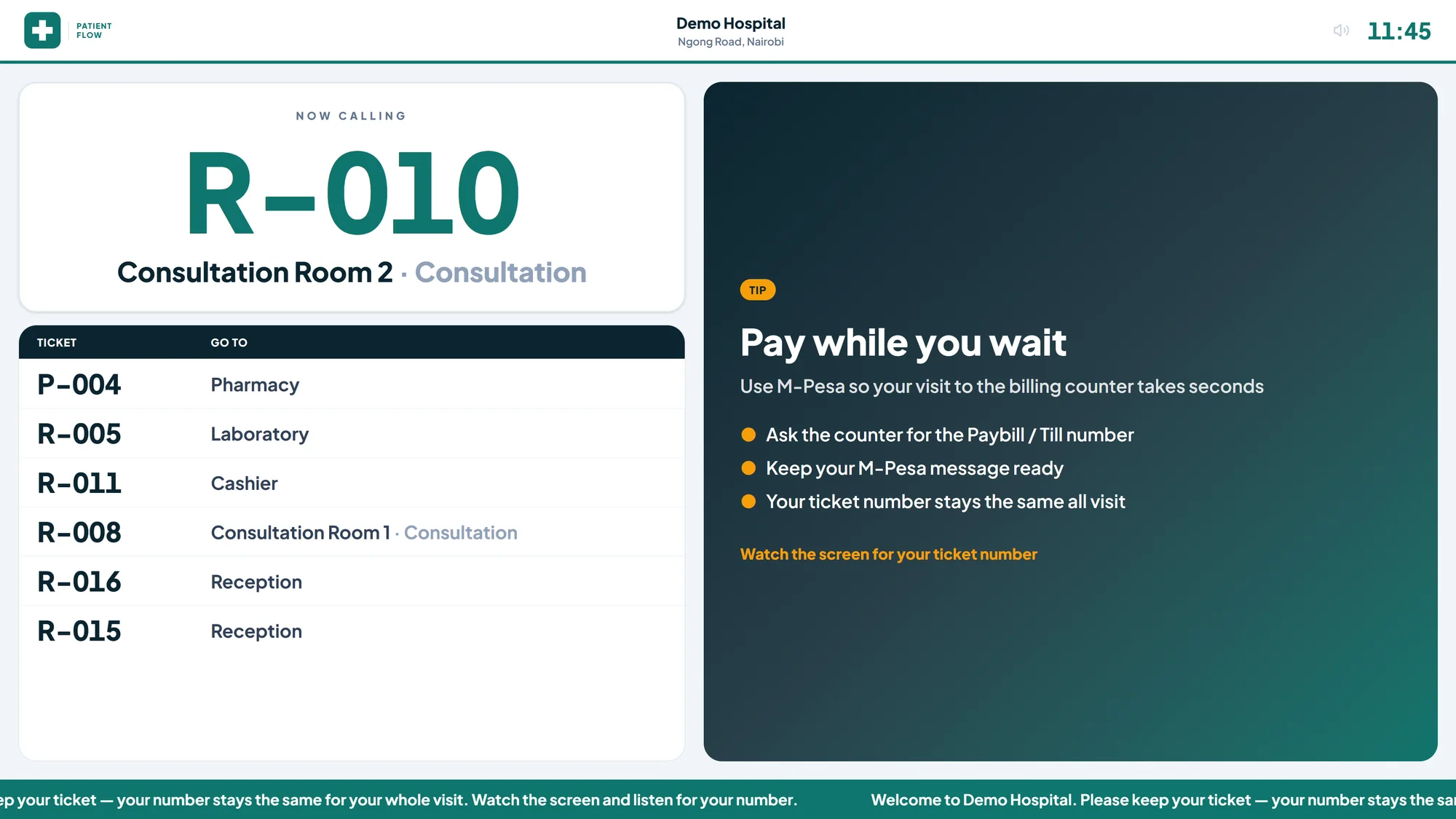
Calls name the place, for example "Ticket number L 0 0 1, please proceed to Laboratory" or "...to Consultation Room 3", on the speaker and on waiting-area TVs. Results returns go to the ordering doctor, and the call order balances new and returning patients, raises anyone who has waited too long, and ranks emergency, urgent, and child or elderly patients first.
Live floor and reports
Queue managers see every station, who is waiting and serving, target-wait breaches and staff on break. They can pause a station with a reason, change a patient's priority, look up a ticket's journey and cancel a ticket. Daily tallies cover registrations, payments cleared, pre-authorisations and waived visits.
Who it is for
TemFlow HQMS suits outpatient departments, medical centres and specialist clinics with several service points. It comes with 24 common specialties and clinics, including dental, ENT, eye, antenatal, child welfare, CCC and TB, and each doctor sees the clinics they serve. Read more on our page for hospitals and healthcare facilities.
Patient data protection
TemFlow HQMS stores no patient names, identifiers or clinical notes. The ticket number is the only link between stations, so the system holds no personal health data under the Data Protection Act 2019. Staff sign in with role-based access and optional two-step verification, and every ticket move is recorded in an audit trail.
Deployment, hardware and support
- Offline by design. One Windows 10 or 11 PC runs the server, database, ticket printer and speaker. Staff PCs, kiosks and TVs open it in a browser over the hospital network. No internet is required.
- Hardware. A touch-screen kiosk, a thermal ticket printer, speakers, and TVs that can open a web page. If the printer or speaker fails, patient flow continues.
- Operations. The installer runs from one file, backups run every hour, and a service manager covers health checks, restarts, logs, restore and password resets.
Our team maps your patient journeys with your clinical and finance leads, configures stations, rooms and payment rules, and trains each role at the station they work. Your logo and colours appear on the kiosk, TV and tickets.
To walk through your own patient journey on TemFlow HQMS, contact us.
TemFlow key features
- Touch kiosk in English and Kiswahili with four entry options: see a doctor or clinic, laboratory, imaging (X-ray or ultrasound) and pharmacy
- One anonymous printed ticket per visit that follows the patient across every service point
- Reception-issued tickets for patients who cannot use the kiosk, and emergency journeys opened at casualty
- Server-checked routing between registration, triage, consultation, lab, imaging, pharmacy, injection room, casualty and discharge
- Payment and pre-authorisation checkpoints: unified or separate cashier, pay-first for cash patients, end-of-visit billing for insured patients
- Results returns to the ordering doctor in a return lane, not billed as a new consultation
- Call order with priorities (emergency, urgent, child or elderly, normal), lane ratios and a long-wait override
- Calls that name the station or consultation room on the speaker and waiting-area TVs
- Staff workspace with call next, recall, hold and resume, no-show, breaks, optional auto-call and queue alerts
- 24 pre-seeded specialties and clinics, with unstaffed service points flagged before routing
- Live floor for queue managers: waiting and serving, target-wait breaches, staff on break, station pause and journey lookup
- Offline Windows installation with hourly backups and a service manager for health checks and restore
Benefits
- Patients know where to go next and stop asking at every door
- Laboratory and imaging receive cash patients already cleared, under rules you set
- Patients with results go back to their own doctor without paying again
- Queue managers see bottlenecks and staff absences during the day
- No patient personal or clinical data is held in the queue system
- The system keeps working without internet and if a printer or speaker fails
Industries we serve
Frequently asked questions
Does TemFlow HQMS replace our HMIS or EMR?
No. TemFlow HQMS manages patient flow only. It stores no patient names, identifiers, clinical notes or amounts of money. Your HMIS keeps the medical and billing records, and HQMS tells each station who is next and where the patient goes after them. Staff record the patient in the HMIS as they do today and use HQMS to call and route.
Can it connect to our hospital system or SMS gateway?
The current release runs standalone and has no integration with HMIS, billing or insurance systems, and it does not send SMS. Running standalone keeps installation simple and avoids sharing patient data. If you need an integration later, we scope it with you and your system vendor as a separate phase.
What happens when a patient returns from the laboratory?
When the laboratory marks results ready, the ticket goes back to the doctor who ordered the test, in a return lane, without a second consultation charge. The call order serves returning patients alongside new ones at a ratio you set. A patient who comes back on another day for delayed results can be marked as a return visit at registration.
How do you handle cash and insured patients differently?
You choose the rules. Cash patients can pay at registration and before each ordered service, so departments receive them already cleared. Insured patients can be billed once at the end of the visit, with a pre-authorisation step for services that need insurer approval. A declined pre-authorisation can convert to cash or end the visit.
What if a patient cannot use the kiosk?
Reception can issue any ticket type the kiosk offers from the staff workspace, so elderly patients or those who need help get the same ticket and the same place in the flow. Emergency patients do not use the kiosk at all: casualty staff open an emergency journey, which takes the highest priority.
What hardware do we need and does it need internet?
You need one Windows 10 or 11 PC to act as the server, a touch-screen kiosk, a thermal ticket printer, speakers and TVs that can open a web page. Staff use their existing PCs through a browser. Everything runs on the hospital network without internet, and backups run every hour.
Request TemFlow HQMS — Hospital Queue & Patient Journey Management Walkthrough & Proposal
Connect directly with our regional solution engineering desk for licensing details, hardware compatibility lists, and rollout timelines.